voice agent hardware
The voice agent hardware checklist: what to test before you buy anything
A working checklist for voice agent hardware: capture framing, pre-roll, audio format, radios, power, controls and what a device does when the network drops.
August 25, 2026 10 min read
Most voice projects spend months on the model and ten minutes on the microphone. The speech to text gets tuned, the prompt gets rewritten forty times, and the capture device is whatever was in a drawer. Six weeks later the accuracy is worse than the demo and nobody can say which layer is at fault. This checklist gives the voice agent hardware decision the same scrutiny as the rest of the stack.
Voice agent hardware is the capture and delivery layer of a voice AI system: the microphone, the control that frames a turn, the radio that carries the audio, and the power and management that keep the unit working. The hardware performs no speech recognition and runs no models, both of which sit on the builder backend.
The short version
- Capture framing is the first thing to settle, because push to talk, a wake word and continuous streaming each cost something different in bandwidth, privacy and user friction.
- Pre-roll buffering holds a short rolling window of audio from before the button press, so the first syllable of a turn is never clipped when somebody speaks a fraction early.
- QuickComm devices capture 16 kHz mono PCM through a 24-bit codec, a format that suits speech recognition and rules out music, stereo positioning and separating two speakers across a table.
- All three QuickComm dev kits use Wi-Fi 802.11 b/g/n on 2.4 GHz and Bluetooth 5.2, ship audio over the loss-tolerant udp-v1 protocol, and stream to an endpoint that can be a server on your own network.
- Power is an operational question rather than a number: the Earpiece runs three hot-swap 700 mAh packs at about 8 hours each and 24 hours combined, while the Table Top holds a 1000 mAh battery and lives on USB-C.
- Nothing beyond voice activity detection runs on the device, so transcription, models, wake word logic and text to speech stay with the buyer.
What should decide when a turn starts and stops?
The user, a wake word or a continuous stream decides, and there is no fourth option. Every piece of voice agent hardware picks one of those three framings, and each one hands you a different bill.
Continuous streaming pays for bandwidth and backend processing on silence, and leaves an open microphone in a room where somebody will eventually notice. A wake word trades that for false triggers, missed triggers and tuning against the accents you have. Push to talk hardware asks the user to act, which is real friction, but produces boundaries nobody downstream has to guess at.
QuickComm devices frame turns with push to talk and never stream silence, with voice activity detection running on the device itself. If your design assumes a room being heard continuously, surface that mismatch on day one rather than in week five.
The belief worth arguing with is that always listening is the mature design and push to talk a stopgap on the way to it. For most builders the opposite holds: unambiguous boundaries produce cleaner audio, smaller bills and shorter conversations with whoever asks about privacy.
Pre-roll and audio format settle your accuracy before a model sees anything
Two capture details account for a large share of transcription errors, and both are fixed in hardware where no pipeline work can repair them: what happens to the audio immediately before a button press, and the format that leaves the device.
Ask any button triggered unit what it does with the moment before the press. An answer of nothing means the opening sound of many turns goes missing, because people begin speaking as they press. Pre-roll buffering keeps a short rolling window so the first syllable survives.
Then pin the format down: sample rate, channel count, bit depth, encoding. QuickComm devices use a 24-bit codec capturing 16 kHz mono PCM, which is what Deepgram, Whisper and OpenAI Realtime want from speech, and not what anyone would choose for music.
What should a device do when the network drops mid sentence?
A device should tell the person holding it, physically and immediately, and your backend should distinguish silence from absence. Evaluations skip the failure question almost every time, and the resulting support tickets arrive disguised as complaints about the model.
Establish the radios first. Every QuickComm dev kit carries Wi-Fi 802.11 b/g/n on 2.4 GHz and Bluetooth 5.2, and ships audio over udp-v1, a loss-tolerant wire protocol built for the fact that voice cannot wait for a retransmission. There is no 5 GHz band, which hurts on congested sites and helps through walls.
Establish next where audio is allowed to go. The stream endpoint is configurable from the QuickComm console and a LAN server is a valid target, so nothing obliges audio to leave the building. Once configured, a device streams straight to that endpoint without depending on the console. Locally the devices also connect over BLE.
The human half of that question matters as much as the retry logic. Somebody who cannot tell a unit is offline keeps pressing the button, then reports that the AI is broken.
Power strategy rather than battery size
A milliamp hour figure on its own answers very little. The useful question is what happens at the end of the charge, because the answer is operational rather than numeric.
A worn device that has to sit on a cable for an hour costs a shift. The QuickComm Earpiece uses three hot-swap 700 mAh packs, about 8 hours each and 24 hours combined, plus a rechargeable charging dock that holds its own charge, so a pack change keeps somebody working.
Fixed units follow a different logic. The Table Top has a 1000 mAh internal battery and USB-C, lives on mains, and treats the battery as cover for moves and short outages. The Bridge Node runs on USB-C and sits inline, so the host radio or console keeps working regardless.
Which controls still work when nobody can look at the device?
Physical buttons work and touch surfaces mostly do not. Count the controls on any candidate, then ask what each does for a user whose hands are busy or whose device sits under a collar.
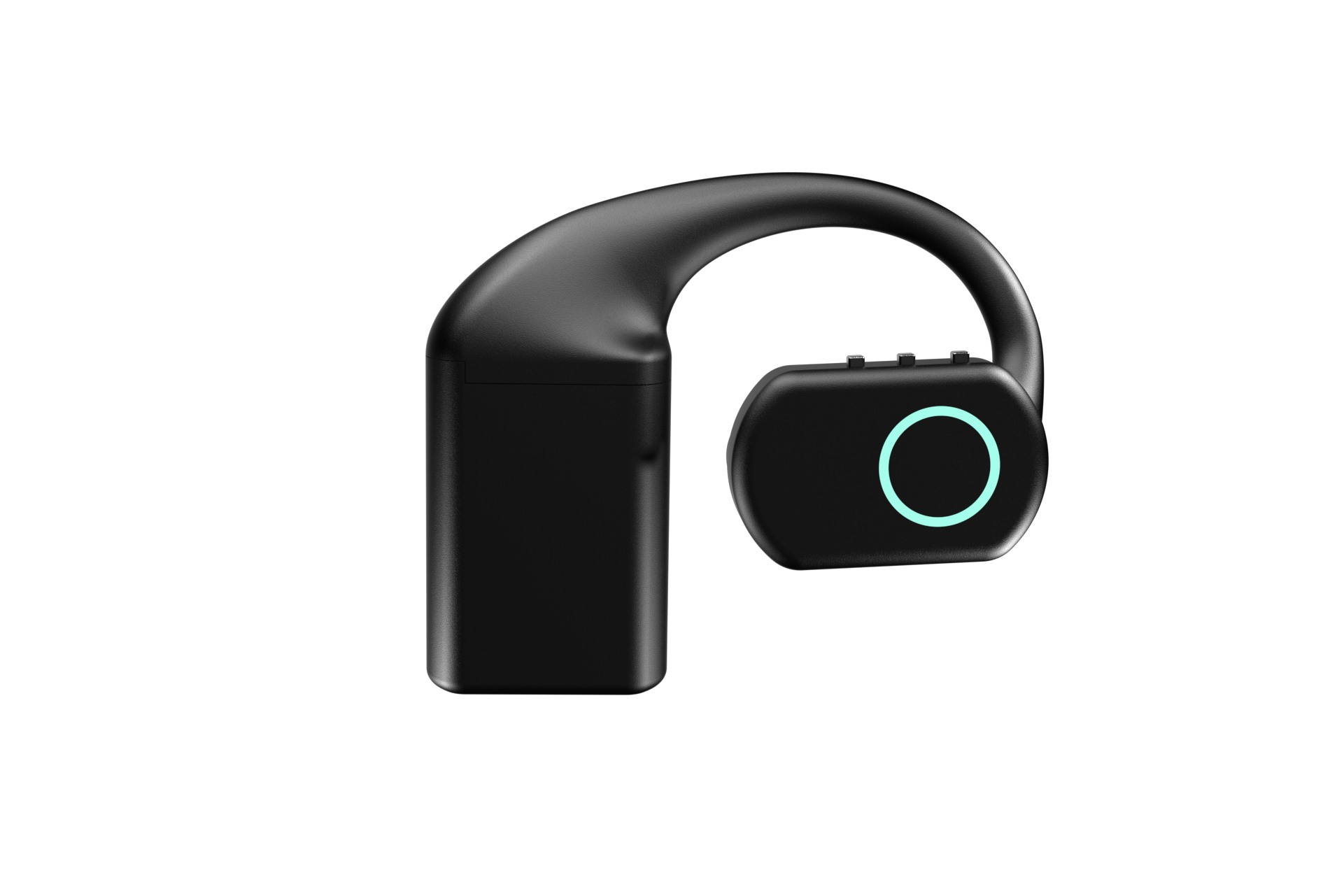
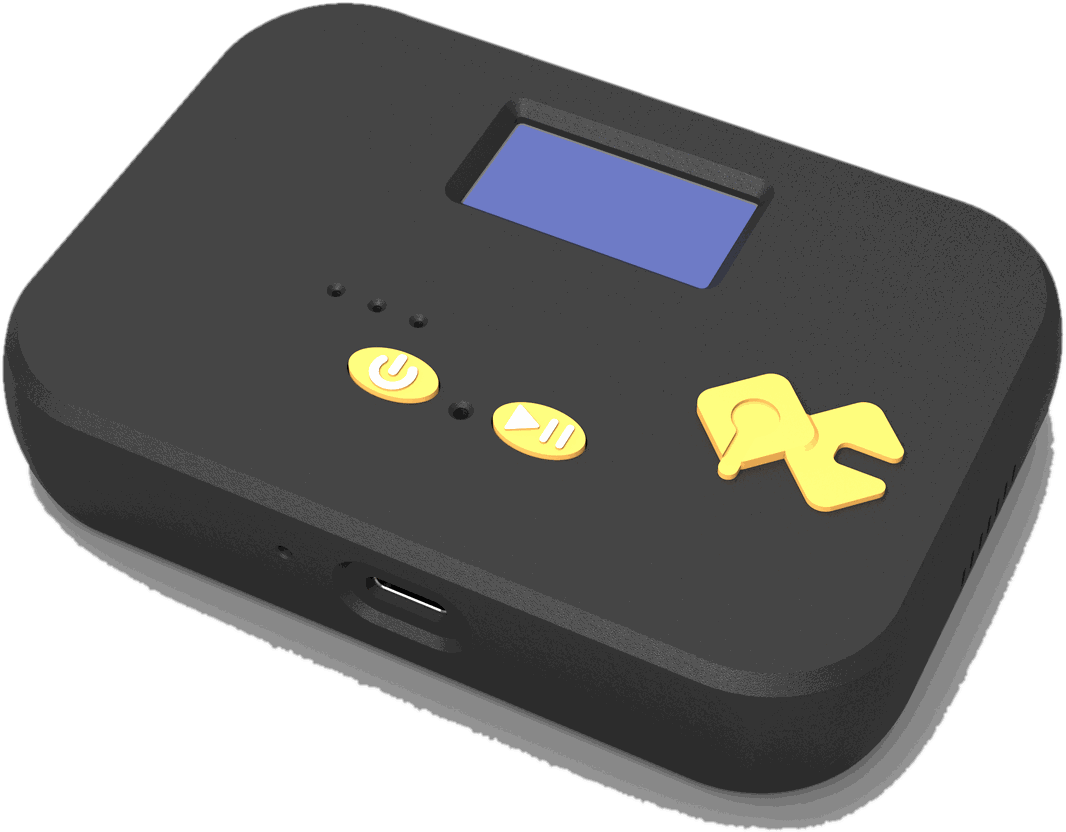
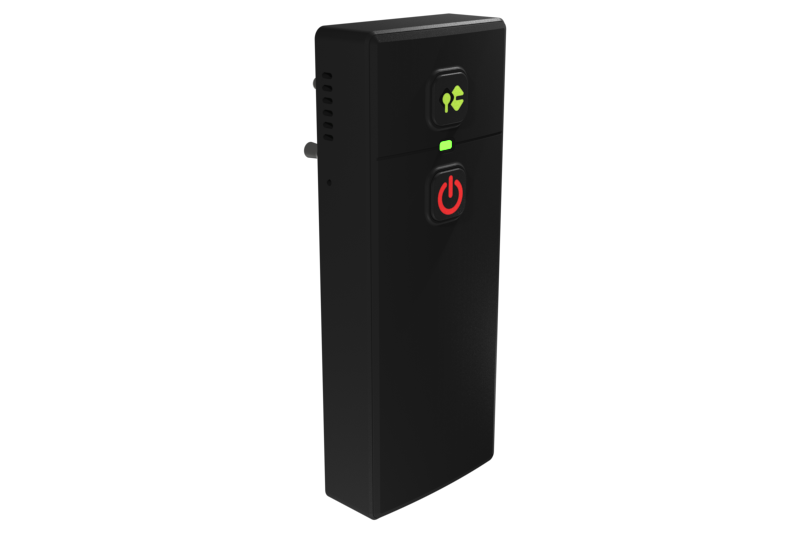
The QuickComm Earpiece has three physical buttons, power, volume up and volume down, and no touch surface. The Table Top puts two buttons, an LED and a speaker beside a display showing network, firmware and assignment. The Bridge Node carries its own display and is two-way, so an agent can hear a channel and answer onto it.
Provisioning, updates and telemetry are the part you buy into
One device is an object on a desk and thirty are a process, so ask how a unit gets its configuration, how firmware moves after deployment, and what it reports about itself while running. Those three answers describe the next two years more honestly than any specification line.
QuickComm devices arrive pre-flashed and get provisioned by scanning a QR code from the console, so there is no serial terminal and no typing an SSID on a two button interface. Firmware moves by OTA firmware updates, remote commands reach a unit you cannot walk to, and health telemetry answers whether a quiet device is alive.
Matching form factor to the constraint you actually have
Form factor is the decision people make first and should make last, because it follows from whether the constraint is a person, a room, or equipment that has to keep working untouched. All three dev kits share the same radios, codec and framing, so the comparison below is physical.
| Device | Form | Controls | Power | Where it fits |
|---|---|---|---|---|
| Earpiece, $220 | Over-ear wearable, MEMS mic, speaker, RGB LED | Three buttons, power and volume, no touch surface | Three hot-swap 700 mAh packs, about 24 hours combined, plus a charging dock | One person on the move with their hands busy |
| Table Top, $90 | Desk or wall unit, display for network, firmware and assignment | Two buttons, an LED, a speaker, mic tuned for table distance | 1000 mAh battery and USB-C, normally on mains | A room microphone for AI capture in a fixed space |
| Bridge Node, $125 | Belt-clip unit with a 3.5 mm and 2.5 mm two-pin jack and a display | Two-way mic and speaker, inline so the host keeps working | USB-C | Radios, intercoms, PA systems and consoles already in use |
Before spending anything, run every item above against a laptop, a phone or a conference speakerphone. If your agent serves one person at one desk, a decent USB microphone plugged into the machine already running your stack is the right answer and dedicated hardware is money wasted.
What this hardware does not do
- No AI runs on the device beyond voice activity detection, so transcription, translation, summarising and language ability belong to the models you choose, from Whisper on your own machine to a hosted ElevenLabs voice.
- No ingress protection rating is claimed, which makes water, dust and concrete floors unproven territory you should test before committing a deployment.
- Capture is 16 kHz mono only, correct for speech recognition and wrong for music, stereo imaging or telling two people apart across a table.
- Wi-Fi is 2.4 GHz only, which matters on congested sites where the quieter 5 GHz band would have been the obvious choice.
- The 12-month warranty excludes physical damage, returns run for 7 days, and buyers pay import duties on arrival under DAP terms.
- The backend and its uptime belong to the buyer, so a healthy device looks exactly like a broken one when the endpoint behind it is down.
The reader who should not buy any of this is the one who wants a finished assistant in the box. QuickComm publishes this checklist as the company selling the three devices in the table, and the honest version of that position is that everything impressive about the finished system will be code you wrote.
Common questions
Does voice agent hardware need to run AI on the device?
No. Voice agent hardware needs to capture cleanly and deliver reliably, and inference can sit wherever you want it. QuickComm devices run voice activity detection and nothing more, sending audio to the endpoint you configure, where OpenAI Realtime, Deepgram, Whisper, ElevenLabs or a local Ollama install does the work.
Can a capture device stream to a server on my own network?
Yes. The stream endpoint on a QuickComm device is configurable from the console and a LAN server is a valid target, so audio need never leave the building. A configured device streams directly to that endpoint without depending on the console, which is what makes self-hosted voice AI practical here.
How do I test capture quality without buying anything?
Record twenty turns on the equipment you own, each beginning with a hard consonant, at the real distance and in the real room. Count the clipped openings, listen for how much room you hear behind the voice, then run the audio through your speech to text. Whatever fails becomes your requirement list.
What actually differs between the three QuickComm devices?
Shape, controls and power, not capability. The Earpiece at $220 is worn and runs on hot-swap packs, the Table Top at $90 sits in a room on mains, and the Bridge Node at $125 clips to a belt and plugs into a 3.5 mm and 2.5 mm two-pin jack so an existing radio or PA keeps working.
Where to take the checklist next
Work through every item against what you own, then read the product page for whichever gap is left. The QuickComm Earpiece, Table Top and Bridge Node are built to order and ship in 10 days worldwide, which is the number to plan around rather than a stock level.
If the checklist says a laptop is fine, buying nothing is the correct outcome of this article. If it says you need hands free operation, capture at room distance or a way onto a radio channel, each product page answers the remaining items, and the 12-month warranty with a 7-day return window covers a device that turns out not to fit.