front desk voice agent
Front desk voice agent: the hardware the counter actually demands
A front desk voice agent stands or falls on the counter: capture across a desk, visible device state, mains power and a press nobody is surprised by.
August 20, 2026 10 min read
Receptions, clinic desks, workshop counters and shop tills all run the same loop. Somebody arrives, says what they need, and staff turn that into a record: an appointment, a job number, a part order, a callback. A front desk voice agent tries to remove the retyping, and it usually succeeds or fails on hardware decisions taken before the first prompt is written. QuickComm publishes this article because those decisions are the ones nobody writes down.
A front desk voice agent is software that captures the spoken exchange at a counter and turns it into a structured record on the reader's own backend, using a fixed capture device rather than a personal headset or a laptop microphone.
The short version
- A counter needs capture across roughly a metre of desk from two directions, which is neither the headset case nor the meeting room case.
- Staff and visitors both need to see device state, so a unit with its own display and LED beats anything that reports only to a dashboard.
- Counters already have mains power, so design for a permanently powered unit and treat its battery as protection against a pulled cable.
- A deliberate press is the strongest consent mechanism available at a desk, because the visitor sees exactly when capture began.
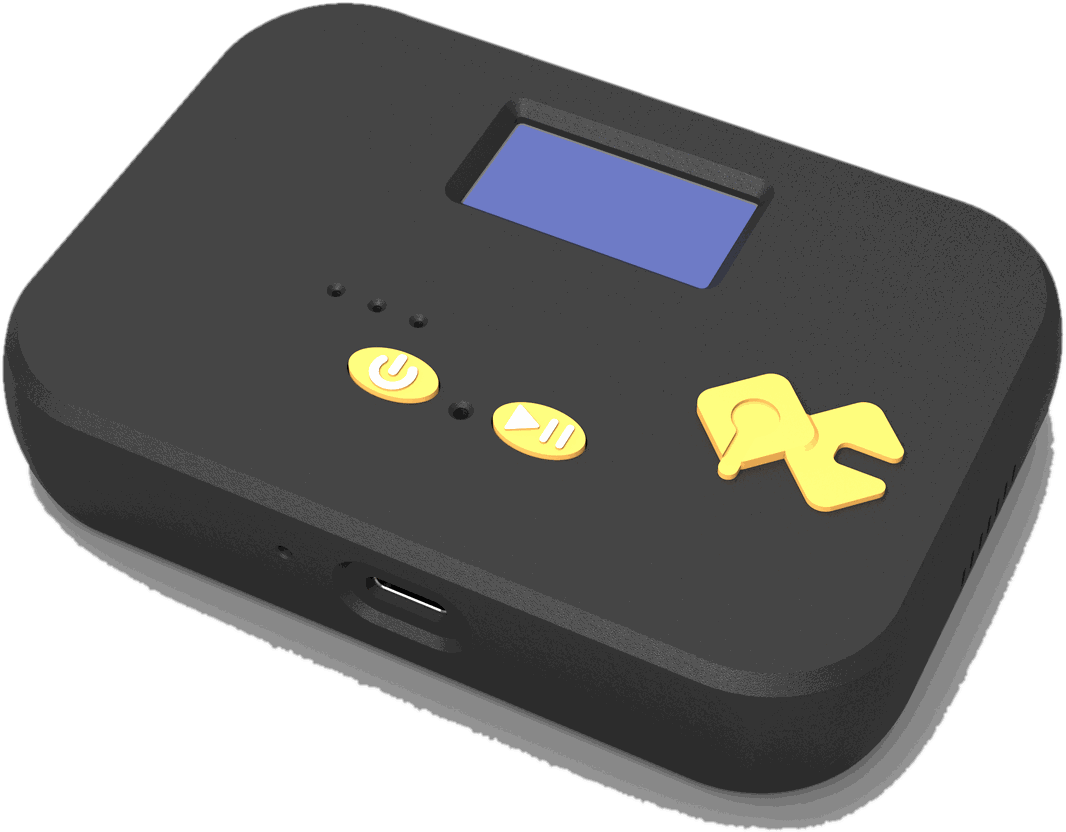
- The QuickComm Table Top is a $90 dev kit built for this position, with a mic tuned for table distance, an on-device status display and two physical buttons.
Why is a counter harder than a meeting room?
A counter is harder because the two people who matter are far apart, facing each other, with objects between them. A headset mic sits centimetres from one mouth. A meeting room mic sits in the middle of a table with people arranged around it. A counter is neither, and it defeats devices tuned for either.
The speech you want arrives from both sides of that gap, at different volumes, often overlapping. Behind it sits whatever the space is doing: a waiting area, a workshop, a queue, a door onto a street. Hard surfaces are common, because counters are built from laminate and glass.
Laptop microphones disappoint here for a specific reason: they are tuned for a face at screen distance, the wrong distance and the wrong angle for somebody standing across a desk. Capture lost at that stage cannot be repaired downstream, however good the model reading the transcript is.
What should a front desk voice agent do first?
A first build should listen to the exchange the staff member is already having and produce the record they would otherwise type. The temptation is to build the version that answers the visitor. Resist that, because the quieter version pays for itself sooner and staff will tolerate it.
- Capture the exchange, produce a draft record, and leave the staff member to confirm or correct it before anything is committed.
- Look up whatever the visitor is asking about and put it on the staff member's screen, without addressing the visitor at all.
- Take the details of a request that is not urgent, then hand a structured summary to whoever handles it later.
All three keep the agent behind the counter rather than in front of it, the correct side of the line for a first build. An agent that talks to a visitor has to be right in public, and the cost of being wrong is a complaint rather than a corrected field.
What does the counter demand of the hardware?
Capture across a desk, not at a face
The device needs a microphone tuned for the distance it will really be used at, meaning about a metre, from two directions. The QuickComm Table Top is a desk or wall unit built for that position: a room microphone for AI work with a mic tuned for table distance, capturing 16 kHz mono PCM through a 24-bit codec.
Placement deserves more attention than it gets. Put the unit between the two speakers rather than in front of one, keep it off the surface the card reader rattles on, and keep it away from glass. Moving a microphone twenty centimetres costs nothing and does more for accuracy than any prompt rewrite.
A device that shows its own state
Two audiences at a counter need to know what the device is doing, and neither can be sent to a dashboard. The staff member needs to know the unit is online and assigned to the right place. The visitor needs to know whether anything is being captured right now.
The Table Top carries an on-device status display covering network, firmware and assignment, plus an LED and a speaker. In a public position that display is not a convenience but the difference between a staff member who trusts the device and one who quietly stops using it.
Power that is already there
Counters have mains power. There is a till, a card terminal, a screen and a label printer, so one more USB-C cable is not a constraint. A fixed unit on permanent power removes an entire class of failure that wearables manage every day.
The Table Top has a 1000 mAh internal battery and USB-C. Treat the battery as what keeps the device alive through a power cut or a cable pulled by somebody cleaning, rather than as the normal operating mode.
Where does recording consent fit at a reception?
Consent at a reception belongs at the moment of capture, not in a laminated notice. A microphone at a front desk hears everything a front desk hears, including the visitor who is upset, the phone call about a diagnosis and two staff members discussing a third.
QuickComm devices use push-to-talk framing, and silence is never streamed. The Table Top has two physical buttons, so capture starts when somebody decides it should. Pre-roll buffering means the first syllable is not lost when the button goes down, which matters at a counter where the useful sentence often begins before anyone reaches for anything.
On-device voice activity detection runs separately from the button, so a held control during a pause does not push empty audio to your backend. Keep the two ideas apart when you explain the system: the button records a human decision, and voice activity detection only reports whether speech is present.
Here is the belief this article argues against. Many teams treat consent as a legal artefact, something a sign and a privacy page discharge. At a counter, consent is an interaction. A press the visitor can see does more for trust, and for the conversation you will eventually have with a regulator, than any wording on a wall.
Where the agent's behaviour lives
The behaviour lives entirely on your backend. The hardware captures and transports audio and does nothing else: no transcription, no interpretation, no field extraction, no decisions. Audio goes to whatever endpoint you configure from the QuickComm console, and your speech-to-text, your models and your text-to-speech run wherever you put them, from OpenAI Realtime or Deepgram to Whisper and Ollama on a box in the back office.
That separation matters more at a front desk than in most deployments, because reception audio is often the most sensitive material an organisation handles casually. A clinic desk hears medical detail. A workshop counter hears registrations and home addresses. Pointing the stream at a machine you own is worth the operational work.
Devices connect over BLE locally, and over Wi-Fi 802.11 b/g/n on 2.4 GHz they stream to whatever endpoint is configured, which can be a LAN server for a self-hosted voice AI stack. Once configured, a device streams directly to your endpoint and does not depend on the console to operate.
Keeping the agent on your side of the counter
A front desk voice agent should make the staff member faster and should not make decisions for them. The failure mode is not a poor transcript. The failure mode is an agent that books the wrong slot, confirms something it should have escalated, or quotes a price that turns out to be wrong in front of a customer.
Practical guardrails are simple to state. Nothing reaches a system of record without a human confirming it. Anything the agent is unsure about becomes a flag rather than a guess. Anything touching money, medical advice, legal commitments or a complaint goes to a person, and the staff member can switch the device off without asking permission.
The real measure of a counter deployment is whether the person behind the desk would miss it if you removed it tomorrow.
What this hardware does not do
The QuickComm Table Top is a capture and transport device sold as a dev kit. No AI runs on it beyond voice activity detection, so it will not transcribe, summarise, route or answer anything. Every one of those functions belongs to the backend you build and operate.
- Wi-Fi is 802.11 b/g/n on 2.4 GHz only, which is worth checking against the network a landlord or IT team gives you.
- Capture is 16 kHz mono PCM, tuned for speech rather than for music or wide-band audio analysis.
- No ingress protection rating is claimed, so a counter that gets hosed down or splashed with coolant is not the right position for it.
- The 12-month warranty excludes physical damage, and a public counter is a place where devices get knocked.
- You own the backend, its uptime and its bills, and audio quality follows the source: a unit placed badly behind glass still sounds like one.
Anyone running one desk that they personally sit at should not buy this yet. A decent USB microphone will carry the first version, because the pipeline is where the hard work lives and most of it can be built before capture hardware matters.
Common questions
Does a front desk voice agent need a dedicated device rather than a tablet?
A tablet captures a counter exchange after a fashion, but its microphone is tuned for a face at screen distance and its state is invisible to the visitor. A front desk voice agent gains most from a fixed unit with a mic tuned for table distance, a visible press and a display both parties can read. Take the tablet route if the counter is yours alone and the pilot is short.
How do several counters stay consistent?
Provision each unit by QR code from the QuickComm console, assign it, and keep firmware level with over-the-air updates. Remote commands and health telemetry cover the units you cannot walk up to. Consistency across counters is the main practical reason to move off improvised capture, because identical hardware in identical positions makes accuracy comparisons mean something.
Can the audio stay inside our own building?
Yes. Over Wi-Fi the device streams to whatever endpoint is configured, and that endpoint can be a LAN server running your own models. QuickComm hardware has no opinion about where your backend lives, and once configured a device does not depend on the console to keep operating.
Should the agent speak to visitors?
Not in a first build. An agent that addresses a visitor has to be correct in public and recovers badly from being wrong. Keep the agent behind the counter, producing drafts for the staff member, until the accuracy of your own stack has been measured on real counter audio rather than on desk recordings.
Putting a unit on the desk
The QuickComm Table Top is $90, pre-flashed, provisioned by QR code and updated over the air, and it ships built to order in 10 days worldwide. Volume discounts begin at 5 units, which is roughly where a multi-counter rollout starts.
The product page carries the full hardware detail, and the builders community on Slack is a reasonable place to ask how other teams positioned units on a counter before you commit to a layout.