AI note taker device
An AI note taker device or laptop software, and when each one wins
Compare an AI note taker device with laptop notetaker software, and see how to build one yourself so meeting audio never reaches a third party service.
July 21, 2026 10 min read
Legal has questions about the notetaker bot that keeps joining your calls, and they are reasonable questions. Meeting audio is some of the most sensitive material an organisation produces, and the standard answer is to hand all of it to a subscription service that transcribes it on infrastructure you have never seen. An AI note taker device is the other route: hardware that captures the conversation and sends it wherever you point it, with every transcript produced by a pipeline you run.
An AI note taker device is a microphone with a network stack, a trigger and a battery, which streams captured speech to a configured endpoint. Notes, summaries and action items are produced by the speech to text and language models running behind that endpoint, never by the device.
The short version
- The hardware captures audio and streams it to an endpoint you configure, and that is the entire job it performs.
- Transcripts, summaries and action items come from your own speech to text and your own models, whether that is self-hosted Whisper, Deepgram, OpenAI Realtime or a local Ollama install.
- Laptop notetaker software is cheaper and better for video calls, provided the vendor data policy is one you can actually sign.
- A device wins for rooms, shift handovers, corridor decisions and every conversation that never touches a calendar invite.
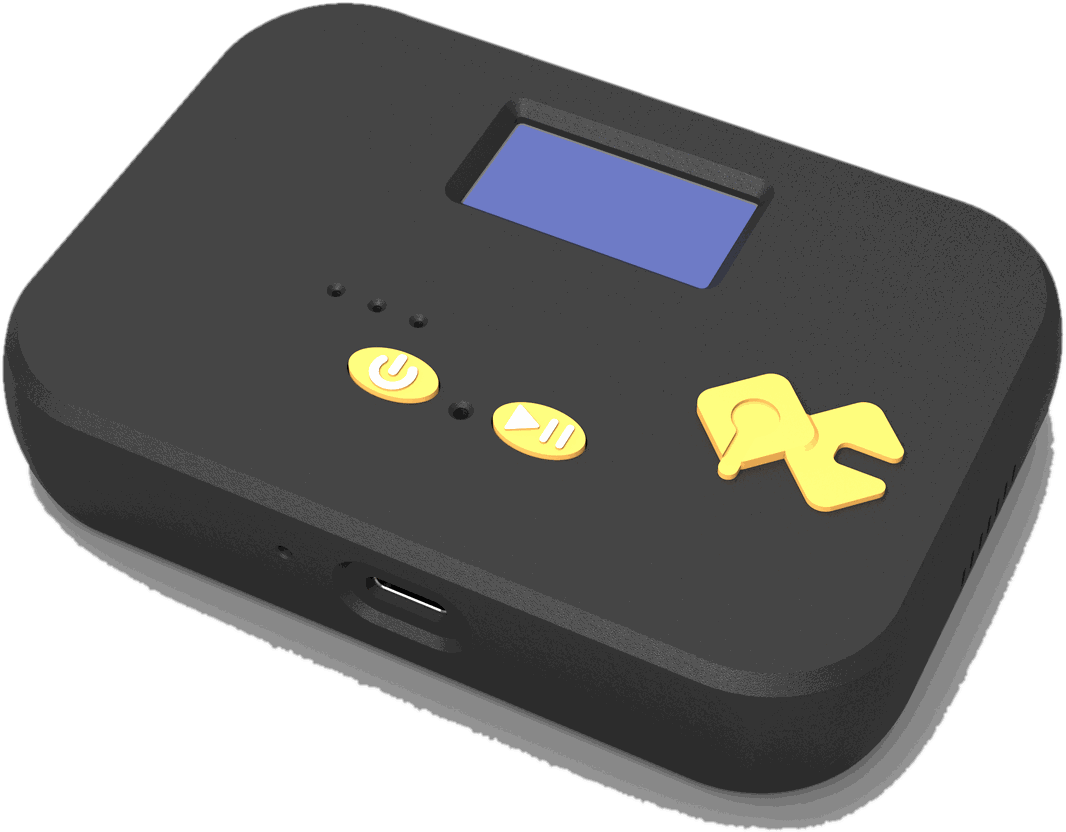
- The QuickComm Table Top is $90 with a mic tuned for table distance, two physical buttons, an on-device status display and a 1000 mAh battery, and the Earpiece is $220 for people who move.
- Both capture 16 kHz mono PCM through a 24-bit codec and reach your backend over Wi-Fi 802.11 b/g/n on 2.4 GHz or connect locally over Bluetooth 5.2 BLE.
What is an AI note taker device actually doing?
The device is capturing speech, framing it into utterances and putting those utterances on the network. QuickComm, which publishes this article and builds these kits in Dubai, is direct about the boundary: the hardware runs voice activity detection on board to tell speech from silence, and nothing beyond that. No transcription, no summarising, no task extraction, no language handling of any kind happens on the device.
Everything a reader would call note taking happens in the pipeline behind the stream endpoint. Your speech to text turns audio into text, your model turns text into a summary, and your prompt decides what counts as an action item. The quality of the notes is a property of your stack, and the device cannot improve it or degrade it beyond the audio it delivers.
That boundary is worth being pedantic about, because the marketing around this category is not. A product advertised as a device that writes your meeting notes is describing a subscription service with a microphone attached, and the audio is going somewhere. With a development kit the destination is a line of configuration you control.
Is laptop notetaker software good enough already?
For scheduled video calls, usually yes, and pretending otherwise would be dishonest. Laptop software already has the audio, already knows who is speaking from the meeting platform, already knows the calendar context, and costs a fraction of any hardware purchase. If your meetings happen on a video platform and your vendor data policy survives a look from your legal team, buy the software and stop reading.
The case changes when either half of that sentence fails. A data policy that cannot be signed rules out the whole category of hosted notetakers regardless of how good the summaries are. A conversation that never happens on a video platform is invisible to laptop software no matter how permissive the policy is.
Most teams discover the second problem later than the first. The meeting was recorded, transcribed and summarised beautifully, and the decision that actually mattered was made twenty minutes afterwards by two people standing next to a machine.
Where does an AI note taker device beat laptop software?
A device wins wherever the laptop is absent, closed or irrelevant. Three situations come up repeatedly, and they have nothing to do with call quality.
Rooms are the obvious one. A workshop review, a clinic discussion or a design session around a table has several people talking and no single laptop microphone positioned to hear them. The QuickComm Table Top sits on the desk or on the wall with a mic tuned for table distance, two physical buttons and an on-device status display showing network, firmware and assignment, so the person running the room can see it is working.
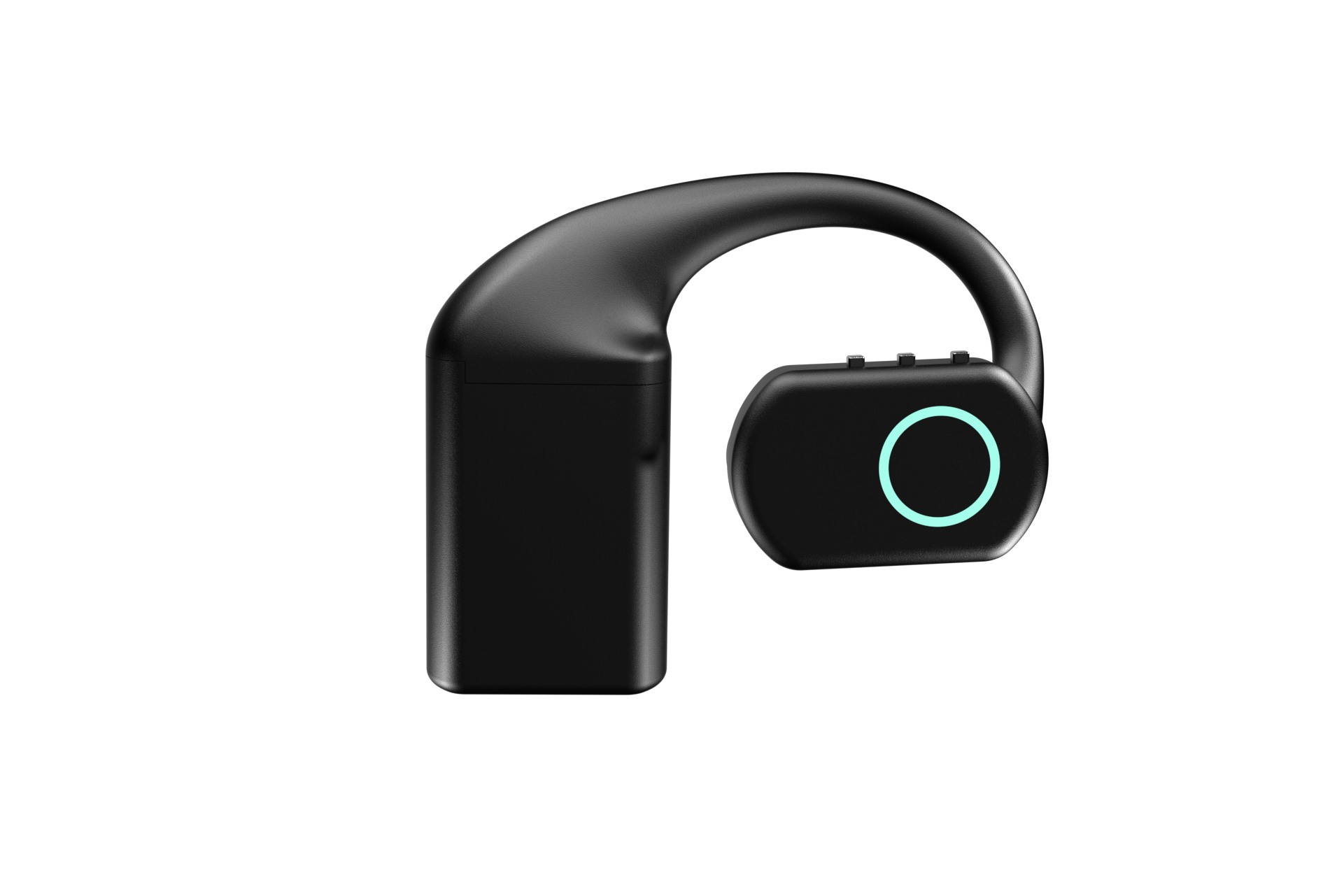
Shift handovers are the second. Handover is where knowledge is lost most reliably, it happens standing up, it happens on time pressure, and nobody opens a laptop for it. The QuickComm Earpiece is an over-ear wearable with three physical buttons and no touch surface, which means it can be triggered without looking at it while both hands are doing something else.
Field and corridor conversations are the third. Site visits, supplier walkthroughs, customer conversations at a counter and the two-minute exchange that changes a plan all share one property: they are the conversations most worth capturing and the ones no meeting platform has ever seen.
The conversations worth capturing are usually the ones nobody put in a calendar.
How do you keep meeting audio out of a third party stack?
Point the device at an endpoint you own and never let the audio leave your network. Locally the device connects over BLE, and over Wi-Fi it streams to whatever endpoint is configured from the QuickComm console, which can be a server on your own LAN. Once configured, the device streams directly to your endpoint and does not depend on the console to operate.
The pipeline behind that endpoint is ordinary engineering. A self-hosted Whisper instance handles transcription without an external call, a local Ollama model produces the summary, and your own storage holds the result under your own retention rules. Teams comfortable with a vendor can swap in Deepgram or OpenAI Realtime for accuracy or speed, and the hardware neither knows nor cares which choice you made.
Push to talk framing helps the privacy argument as much as the bandwidth one. Silence is never streamed, so an idle device in a room is not producing audio, and pre-roll buffering means the first syllable still survives when somebody presses and speaks in the same movement.
Who presses the button, and what the room thinks about it
Somebody presses the button, and that turns out to be a feature rather than a chore. Push to talk framing makes capture an act rather than a background condition, which is a far easier thing to explain to the people in a room than a bot that joined the call silently and stayed.
The QuickComm Table Top signals with an LED and an on-device display, and the Earpiece carries an RGB LED, so the state of the device is legible from across a table. Silence is never streamed, which removes the argument about whether the thing has been listening all afternoon.
Consent gets easier when the audio is not leaving the building either. A pipeline that ends at a server you run turns the question from trusting a vendor into trusting your own retention policy, and the second is a policy your team can actually write and enforce.
What does building your own note taker actually involve?
Three pieces: a device, an endpoint that accepts a stream, and a pipeline that turns audio into text and text into notes. The device arrives pre-flashed, so the hardware side is QR provisioning and three easy steps from the console, with the documentation living in the console alongside your account.
The endpoint is a service you write, and the wire protocol is udp-v1, which is loss tolerant by design so a dropped packet costs a fragment rather than stalling the conversation. From there the work is the work you would do anyway: buffering utterances, calling your speech to text, and prompting your model for the summary shape your team wants.
The numbers group neatly. Table Top at $90, Earpiece at $220, 8 MB flash, 16 kHz mono PCM, 24-bit codec, built to order and shipped in 10 days worldwide, with volume discounts of 5% at 5 units rising to 20% at 50. Running cost after that is your own transcription and model usage, because there are no per-channel fees and no platform lock-in.
What this hardware does not do
- The device does not transcribe, summarise, translate or extract tasks, and voice activity detection is the only processing it performs on board.
- The device does not identify speakers, because diarisation is a property of whatever transcription stack you run behind your endpoint.
- Capture is 16 kHz mono PCM only, which is a speech format rather than a recording format.
- Wi-Fi is 2.4 GHz only on 802.11 b/g/n, so sites running 5 GHz exclusively need a 2.4 GHz network first.
- QuickComm publishes no ingress protection rating for either device, so treat both as indoor equipment.
- You own the backend that produces the notes, along with its uptime, its storage and its retention policy.
A reader who wants notes appearing in a shared workspace this afternoon, with nothing to build and nobody to run a server, should buy a notetaker subscription instead. Development kits are for teams who have decided the pipeline is theirs to own, and for whom that ownership is the point rather than an inconvenience.
Common questions
Does an AI note taker device work without an internet connection?
It works without the public internet as long as your endpoint is reachable. Over Wi-Fi the device streams to whatever endpoint is configured, and a LAN address is perfectly valid, so a self-hosted transcription server inside the building keeps the whole loop local. What the device cannot do is store and forward a full day of meetings on its own.
Which device should I use for a meeting room?
The QuickComm Table Top at $90 is the room device, with a microphone tuned for table distance, a speaker, an LED and an on-device display showing network, firmware and assignment. The Earpiece suits one person moving through a shift rather than a group seated around a table.
How good will the transcripts be?
As good as the speech to text you choose and the acoustics of the room. The device delivers 16 kHz mono PCM captured through a 24-bit codec, which is the format speech recognition models expect, and everything after that is your stack. Two teams with identical hardware and different models will get noticeably different notes.
What is the warranty and returns position?
Kits carry a 12-month warranty that excludes physical damage, and returns run to 7 days. Support is lifetime, and there is a builders community on Slack for the pipeline questions that no warranty covers.
Trying it on one room first
Start with a single Table Top in the room where the most decisions get made, and point it at a Whisper instance you already run. One device and one endpoint will tell you within a week whether your own summaries are good enough to replace the subscription, and that answer depends far more on your prompt than on your hardware.
The Table Top and Earpiece product pages carry the full specification, and both are built to order with a 10-day worldwide lead time. If the reason you have not built your own AI note taker device is that the microphone side looked like a distraction, that is the part these kits are meant to remove.